The Great Flip Debate: Mastering Long Edge Vs Short Edge for Professional Results
The Great Flip Debate: Mastering Long Edge Vs Short Edge for Professional Results
In the meticulous world of print production and graphic design, the orientation in which a sheet of paper is fed through a printer or photocopier can significantly impact output quality, efficiency, and even cost. The choice between flipping a document on its long edge versus short edge is far more than a trivial setting; it is a fundamental decision that dictates whether a finished booklet lies flat or curls, how text aligns with the binding, and how seamlessly multi-page documents align when stacked. This seemingly minor adjustment bridges the gap between digital creation and physical reality, transforming a simple stack of papers into a coherent, professional product.
The terminology itself can be a source of confusion, as it is often described in relation to the document's own dimensions rather than the printer's input tray. Essentially, the decision hinges on the axis along which the pages are flipped to transition from the front side (recto) to the back side (verso) of the sheet. Understanding the distinct visual and functional outcomes of each method is critical for anyone responsible for producing reports, manuals, presentations, or marketing collateral. By dissecting the mechanics and aesthetic consequences of flipping on the long edge versus the short edge, one can demystify a common point of friction and achieve a consistently polished result.
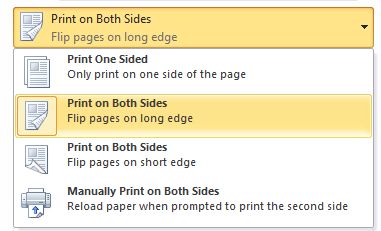
To grasp the practical difference, it is helpful to visualize a standard sheet of A4 paper, which measures 210mm by 297mm. The longer side is 297mm, and the shorter side is 210mm. When a document is set to **Flip on Long Edge**, the page rotates around the horizontal axis, much like the pages of a book lying flat on a table. If you were to hold a printed A4 sheet with the text in portrait orientation and flip it over by lifting the top edge down toward you, you are performing a long-edge flip. Conversely, a **Flip on Short Edge** involves a vertical rotation, like turning the page of a standard paperback novel. Lifting the right side of the sheet horizontally to turn the page executes a short-edge maneuver.
The visual impact of these two methods is immediately apparent in the layout of the final, bound document. Consider a double-sided A4 brochure intended to be folded in half. If you use a **long-edge flip** and then fold the paper, the pages will align sequentially from left to right, creating a layout that mimics the experience of reading a book. The top of the page remains the top, and the text flows in a continuous, logical direction. In contrast, a **short-edge flip** will cause the pages to misalign in a way that can be disorienting; the top of the page on the verso side will appear on the bottom when the sheet is folded, effectively creating a "head-to-head" or "foot-to-foot" reading experience that often requires the document to be rotated to read comfortably.
This structural distinction becomes critically important in professional settings, particularly for presentations and booklets. A sales manager at a corporate training firm, who wished to remain anonymous to discuss internal frustrations, noted the tangible difference in client perception. "We used to default to the default setting," the manager explained. "Clients would receive a training manual that looked sloppy because the pages didn’t align. Switching to a **flip on long edge** for all our saddle-stitched reports was the single biggest change in perceived quality we ever made. It signals attention to detail." The orientation dictates whether the document lies flat when open—a crucial factor for usability. A document flipped on the long edge will open flat, allowing the spread to rest evenly on a conference table. A document flipped on the short edge may refuse to stay flat, curling inward and breaking the reader's concentration.
The practical application of these settings varies significantly depending on the final output method. For **digital copiers and office printers** that offer a "2-sided" or "Duplex" printing option, the flip setting is usually presented as "Long Edge" or "Short Edge." Here is a quick reference for common scenarios:
* **Reports and Manuals (Binding on the left):** Use **Flip on Long Edge**. This ensures that as the pages stack, the text remains upright and sequential from the first page to the last.
* **Presentation Packets (Stapled on the left):** Use **Flip on Long Edge** to maintain a consistent reading flow across the spread.
* **Notebooks or Folded Flyers (Folded perpendicular to the binding):** A **Flip on Short Edge** may be appropriate to ensure the front and back covers align correctly when folded.
* **Posters or single-sheet marketing materials:** The setting is usually irrelevant unless the sheet is being folded for packaging.
Beyond aesthetics, the choice can have subtle implications for efficiency. In high-volume printing environments, the path a document takes through the machine can sometimes be marginally different depending on the flip setting, potentially affecting jam rates. However, the most significant factor remains user error. The primary cause of incorrectly flipped documents is a mismatch between the printer setting and the folding method. A document intended to be folded in half vertically—which requires a **flip on short edge**—will appear perfectly logical on a computer screen in "portrait" mode, but if the printer is set to "long edge," the physical result will be a chaotic mess of inverted pages.
Technology has attempted to mitigate this confusion through software intelligence. Many modern document workflows and PDF viewers offer a "Read Mode" or "Presentation Mode" that simulates the final folded look. However, the onus remains on the operator to select the correct physical output setting. As one print operations specialist noted, "Software can only simulate what you mean; it cannot guess your intent. The terms 'long edge' and 'short edge' are mathematical descriptions of the paper's axis. They remove ambiguity if you take a moment to visualize the sheet."
Ultimately, mastering the flip on long edge versus short edge is an exercise in spatial reasoning and attention to detail. It transforms a mundane administrative task into a deliberate act of design. By understanding that a long-edge flip rotates the document horizontally, preserving the top margin, and a short-edge flip rotates it vertically, a professional can ensure that every document they produce—from a simple memo to a complex annual report—lands exactly as intended. The difference between the two is the difference between a document that feels complete and one that feels fundamentally broken.
Related Post
Long Edge Flip vs Short Edge Flip: Precision Meets Utility in Flooring Installation